
This article uses affiliate programs, including moshimo, Rakuten Affiliate, and A8.net, to introduce products.
If you're searching for a monitor arm — to raise your monitor to eye level, or to free up depth on your desk — you'll quickly run into a wall of similar-looking products that are hard to tell apart. Monitor arms broadly split into two mount types: clamp-mount (clamps onto the edge of the desk) and grommet-mount (passes through a hole drilled in the desktop) — and which one you use changes how much it affects your desk. Here we compare four products by scoring them on five criteria: weight capacity, supported screen size, warranty, mounting and extra features.
📐 Of the four products compared, only ELECOM supports a weight capacity of 20 kg.
Our Picks — The Right One for You

ARES WING JP-HM-GDT1009BK
- MountingClamp and grommet
- Cable managementCable storage included
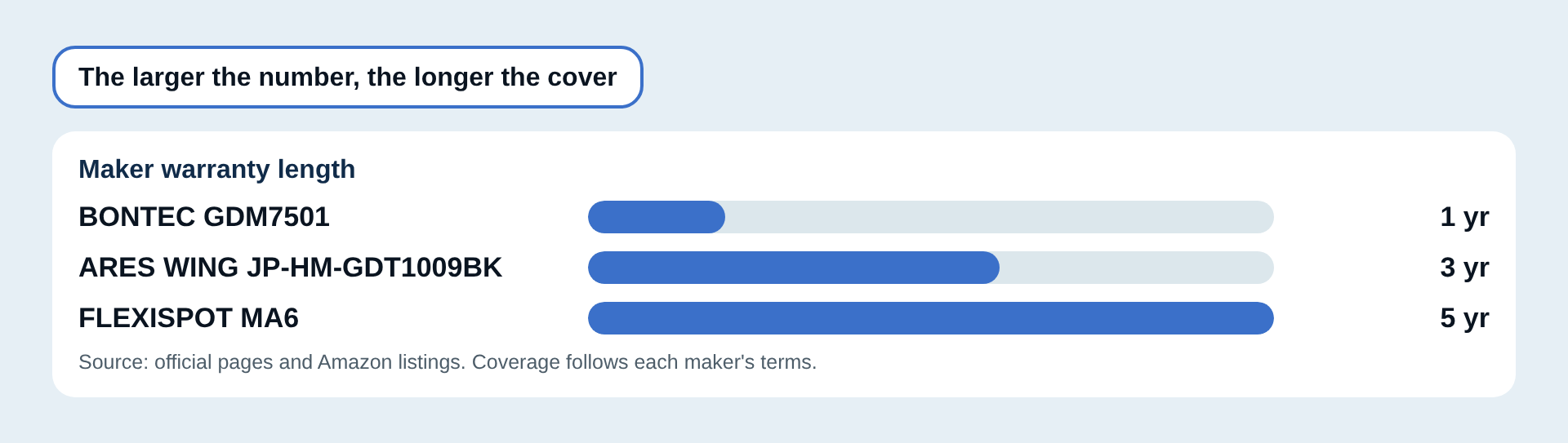
- Warranty3-year maker warranty
Supports screens up to 40 inches and 2 to 12 kg, with a 3-year warranty. #1 on the Spec Score (scored on four criteria, as no desk-thickness figure is published for mounting).

ELECOM DPA-SL07BK
- MechanismGas spring
- VESA75×75 mm / 100×100 mm
The highest weight capacity of the four at 20 kg, and the widest screen-size range (17 to 49 inches). A gas-spring arm with a cable holder built in. Warranty period could not be confirmed.

FLEXISPOT MA6
- Vertical range−90° to +15°
- Cable management3 points
- Warranty5 years
A 5-year warranty, the longest of the four. Curved monitors up to 39 inches, and 3 to 12 kg weight capacity.

BONTEC GDM7501
- VESA75×75 mm / 100×100 mm
- MountingC-clamp and grommet
- Warranty1-year maker warranty
The lowest Amazon price of the four at ¥4,299. Supports 9 kg and 13 to 32 inches, which is smaller, with a 1-year warranty.
Pros and Cons of Monitor Arms
Here's a summary of what tends to satisfy people after buying, and what's worth checking before you do.
Pros
- No monitor stand needed, freeing up desk depth
- Fine height and angle adjustment makes it easy to match your eye level
- Cable routing can be bundled and hidden along the arm
Cons
- Can't be installed if your monitor's weight is close to or over the weight capacity limit
- If your desktop is too thin or too thick, it may fall outside the clamp's supported range
- Grommet mounting requires drilling a hole in the desktop
How to Choose a Monitor Arm: 6 Points
Here are 6 points to check before you buy. The figures in the diagrams come from the official and retail-page specs of the products in this article.
Does Your Monitor's Weight Fit the Weight Capacity?
Check your monitor's weight first. Outside the stated range it cannot be held properly, and the arm may sag. The listed figure is a maximum, so leave some margin.
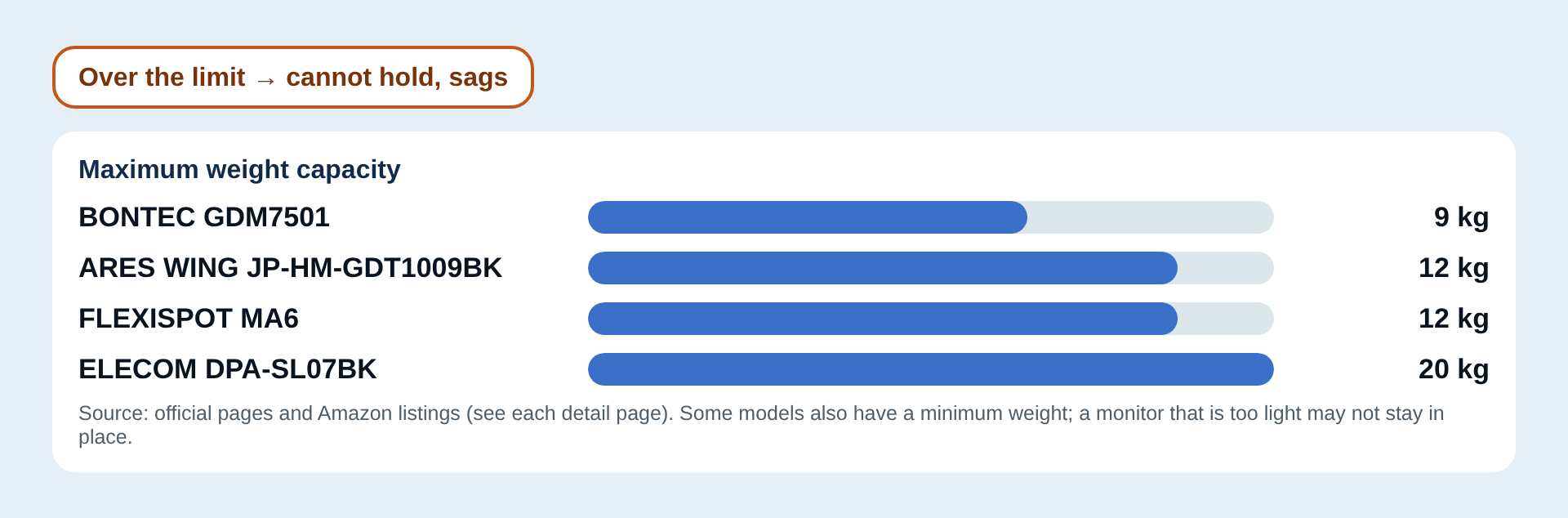
Related pickELECOM DPA-SL07BK(Weight capacity 5/5)
Check Screen Size and the VESA Standard
If the screen size or the screw-hole spacing on the back of the monitor (the VESA standard) does not match, the arm simply will not fit. Most monitors use 75×75 mm or 100×100 mm; check the manual or the label on the back.
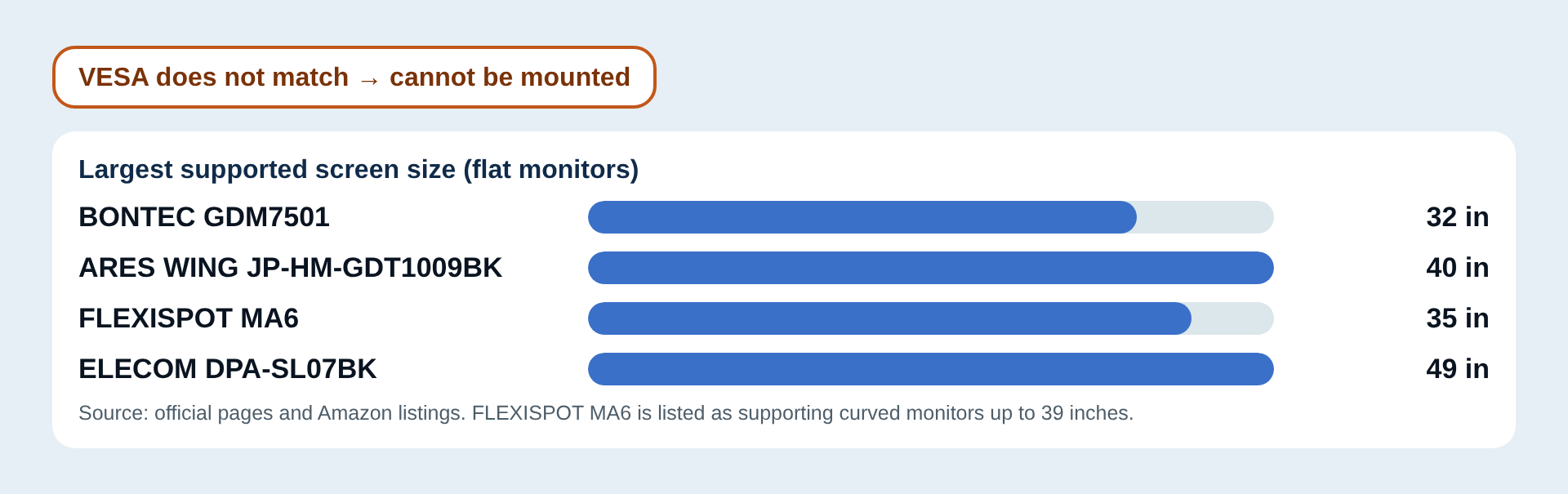
Related pickARES WING JP-HM-GDT1009BK / ELECOM DPA-SL07BK(Screen size 5/5)
Mounting: Clamp or Grommet?
A clamp grips the edge of the desk and needs no drilling. A grommet mount passes through a hole in the desktop, so it assumes drilling. If you rent, pick a model that supports clamping. All four products here are listed as supporting both clamp and grommet mounting.
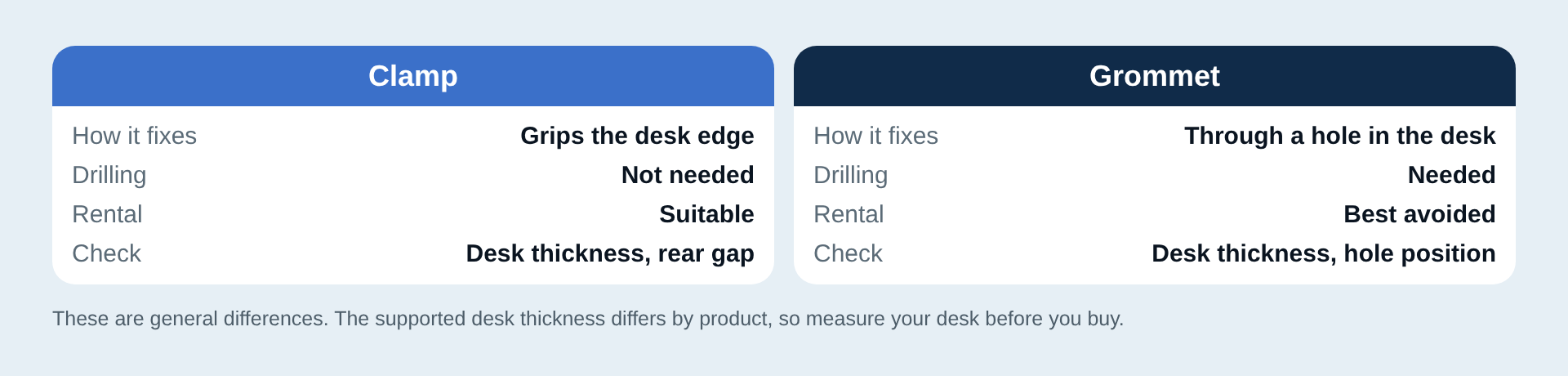
Related pickFLEXISPOT MA6 / BONTEC GDM7501(Mounting 4/5)
Arm Mechanism: Gas Spring or Mechanical Spring
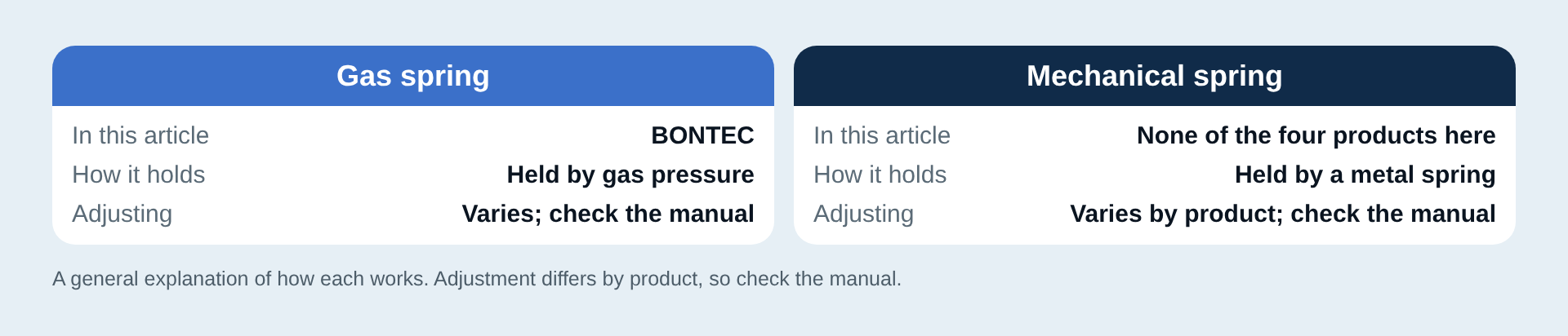
A spring is what lets the arm move and then hold its position. There are gas-spring types, which use gas pressure, and mechanical-spring types, which use a metal spring. Among the four products here, BONTEC and ELECOM are listed as gas-spring types.
Warranty Length
An arm is something you keep for years, so look at the warranty too. The length of the maker warranty differs a lot between products.
Related pickFLEXISPOT MA6(Warranty 5/5)
Extra Features (Cables, Easy Mounting, Adjustment)
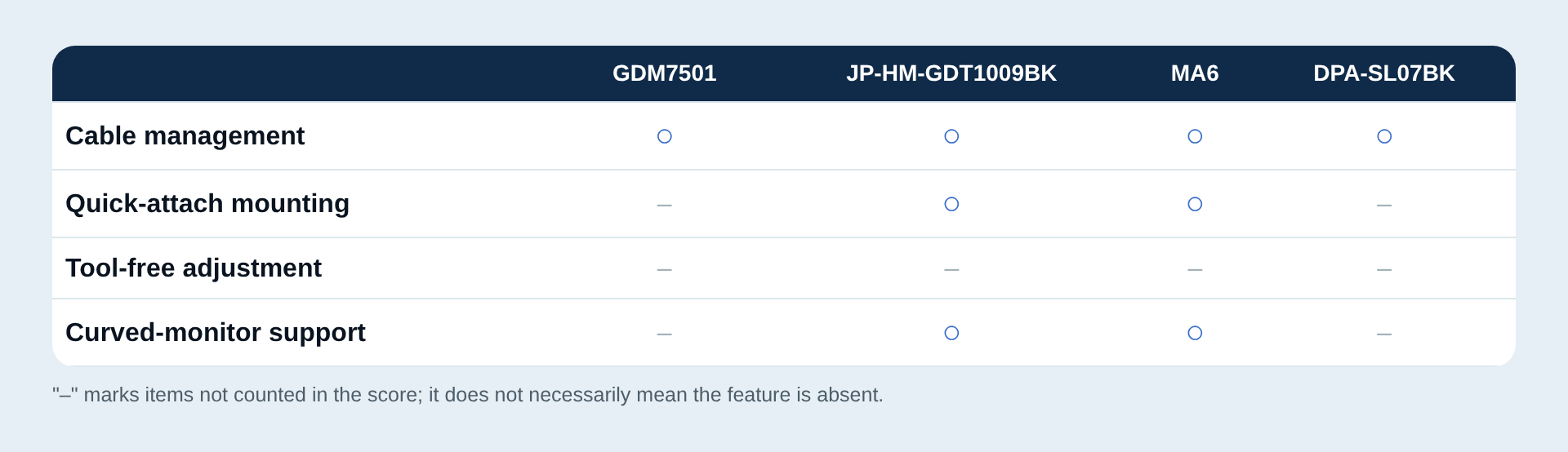
Cable management, quick-attach mounting, tool-free adjustment and other handy extras, in one table.
Related pickFLEXISPOT MA6 / BONTEC GDM7501(Mounting 4/5)
Spec Score Ranking
→ Swipe sideways to see the full table. Use the buttons to re-sort. Click a product name for details. You can also sort by clicking a column heading.
| Rank | Product | Buy (prices as of date shown) | ||||||
|---|---|---|---|---|---|---|---|---|
| 1 | ARES WINGJP-HM-GDT1009BKClamp and grommet | 4.29 | 4 | 5 | 4 | – | 4 | See on Amazon¥4,552See on Rakuten¥7,488Price as of 2026-10-14 · affiliate link · Opens the shop's site |
| 2 | ELECOMDPA-SL07BKGas spring | 4.12 | 5 | 5 | – | 3 | 2 | See on Amazon¥7,000See on Rakuten¥9,670Price as of 2026-10-14 · affiliate link · Opens the shop's site |
| 3 | FLEXISPOTMA6Spring type, clamp or grommet | 3.90 | 4 | 3 | 5 | 4 | 4 | See on Amazon¥8,058See on Rakuten¥9,480Price as of 2026-10-14 · affiliate link · Opens the shop's site |
| 4 | BONTECGDM7501Gas spring | 2.30 | 2 | 2 | 2 | 4 | 2 | See on Amazon¥3,999See on Rakuten¥7,999Price as of 2026-10-14 · affiliate link · Opens the shop's site |
Prices are as of 2026-10-14. They change with sales and stock, so please check the current price on the linked page.
A "–" in the table means the manufacturer and retail pages do not list that item (it is not counted in the score).
What each criterion means, and its weight
Each criterion is scored 1 to 5 and the overall score is the weighted average. The exact thresholds are in How the Spec Score Is Calculated.
- Weight capacityweight 30%
- Maximum weight capacity listed
- Screen sizeweight 25%
- Largest supported screen size (flat monitors)
- Warrantyweight 15%
- Length of the maker warranty
- Mountingweight 15%
- Mounting (starts at 1 point, +1 for each that applies)
- Extra featuresweight 15%
- Extra features (starts at 1 point, +1 per listed feature, max 5)
- Overall Spec Score
- Shown only when at least 4 of the 5 criteria have a score; the weighted average is taken over the criteria that do.
Compare 2 to 3 products side by side
Tick "Add to compare" in the table above and the products appear here (up to 3).
Product Notes
ARES WING・Clamp and grommet
ARES WING JP-HM-GDT1009BK
- Weight capacity4/5
- Screen size5/5
- Warranty4/5
- Extra features4/5
Good forBest if you are considering a larger monitor
Good points
- Supports 17 to 40 inches
- 2 to 12 kg weight capacity
- 3-year warranty
Things to note
- Both screen size and weight capacity fall short of ELECOM's (17 to 49 inches, 20 kg)
- No official Japanese spec page was available; figures come from the Amazon listing
ELECOM・Gas spring
ELECOM DPA-SL07BK
- Weight capacity5/5
- Screen size5/5
- Mounting3/5
- Extra features2/5
Good forBest if you want headroom on weight capacity or use a larger monitor
Good points
- Approx. 2 to 20 kg weight capacity, the highest of the four
- Supports 17 to 49 inches, the widest range of the four
- Built-in cable holder along the arm
Things to note
- No warranty period is stated on the maker's site or the retail page — could not confirm
- Supported desk thickness is about 12 to 50 mm; thicker desktops won't fit
FLEXISPOT・Spring type, clamp or grommet
FLEXISPOT MA6
- Weight capacity4/5
- Screen size3/5
- Warranty5/5
- Mounting4/5
- Extra features4/5
Good forBest for curved monitors or a long warranty
Good points
- A 5-year warranty, the longest of the four
- Supports curved monitors up to 39 inches
- Tilt and rotation ranges are published as angles
Things to note
- Flat monitors are supported only up to 35 inches
- The 12 kg ceiling falls short of ELECOM's 20 kg
BONTEC・Gas spring
BONTEC GDM7501
- Weight capacity2/5
- Screen size2/5
- Warranty2/5
- Mounting4/5
- Extra features2/5
Good forBest for trying a monitor arm for the first time
Good points
- The lowest Amazon price of the four (¥4,299)
- Supports both clamp and grommet mounting
- Cable routing built into the arm
Things to note
- 9 kg, the lowest weight capacity of the four
- Supports 13 to 32 inches, and the warranty is 1 year
Who Monitor Arms Are a Good Fit For — and Who Should Consider Other Options
As a category, monitor arms tend to work well for the following people.
Good fit if you...
- Want to free up desk depth by skipping a monitor stand
- Adjust your monitor's height and angle frequently
- Want to bundle your cable routing neatly along the arm
Consider other options if you...
- Have a monitor whose weight is at or well over the arm's weight capacity
- Are renting and must avoid drilling holes (stick to models supporting clamp mounting)
- Already have a monitor stand you're happy with and don't need to switch
Still Deciding? Check These in Order
The VESA standard is the spacing of the screw holes on the back of your monitor — almost always 75×75mm or 100×100mm. Check the manual or the label on the back.
Still deciding? Check these in order
Check the weight in your monitor's spec sheet and choose a model whose weight capacity covers it.
If it doesn't match, the arm simply won't mount, so check your monitor's VESA standard before buying.
If you can't drill, stick to clamp-mount models (or ones that support both clamp and grommet mounting).
Things to Know Before You Buy, and How to Handle Them
Small points can still lead to regret if you buy without knowing them. Here are three things worth knowing before you buy, and what to do about each.
The arm may sag as you use it
An arm is held up by a spring, so if the holding force is not enough for your monitor's weight, it may sag. Among the products here, BONTEC is listed as a gas-spring type. How to adjust it differs by model, so check the manual.
Grommet mounting requires drilling a hole in the desktop
This is best avoided on a rented desk that must be restored to its original condition. If you do not want to drill, choose a clamp-only model, or one that supports both clamp and grommet mounting.
If the VESA standard does not match, it cannot be mounted
If the screw-hole spacing on the back of your monitor (the VESA standard) is outside a product's supported range, the arm will not fit. Checking your monitor's VESA standard in the manual or on the back label before buying makes this easy to avoid.
Small points are easier to avoid when you know them in advance.
Best Pick by Situation
If you're trying a monitor arm for the first time, BONTEC is the pick. If you're planning to move up to a bigger, heavier monitor, go with ARES WING. If you use a curved monitor or want a solid warranty, FLEXISPOT MA6 is the candidate. And if you use a heavy monitor or want extra headroom on weight capacity, ELECOM DPA-SL07BK fits the bill.
First Steps After You Buy
There is nothing difficult here. These three steps make post-installation mistakes easier to avoid.
Measure your desk thickness against the clamp's supported range
Measuring before you install helps you avoid the frustration of the arm not fitting once it arrives.
Check the range of motion before connecting cables
Before mounting your monitor, move the bare arm up, down, left and right to confirm the range of motion is what you expect, then connect the cables. This cuts down on redoing things later.
If it starts to sag, check how to adjust it
If the arm seems to be sagging slightly, check the manual for how to adjust it. The method differs by model.
How the Spec Score Is Calculated
Each criterion is scored from 1 to 5, and the overall score is the weighted average. We use the manufacturer's official figures; where the official site could not be read, we fill in from Amazon, Rakuten Ichiba, Kakaku.com and similar retail or comparison pages (only pages that match the exact model number). A criterion with no published figure is left out and the average is taken over the rest (for care and features, only items that are actually listed earn points).
| Weight capacity (30% weight) | Maximum weight capacity listed 14 kg or more = 5 / 12 kg or more = 4 / 10 kg or more = 3 / 8 kg or more = 2 / under 8 kg = 1 |
|---|---|
| Screen size (25% weight) | Largest supported screen size (flat monitors) 40 in or more = 5 / 36 in or more = 4 / 34 in or more = 3 / 30 in or more = 2 / under 30 in = 1 |
| Warranty (15% weight) | Length of the maker warranty 5 years or more = 5 / 3 years or more = 4 / 2 years or more = 3 / 1 year or more = 2 / under 1 year = 1 |
| Mounting (15% weight) | Mounting (starts at 1 point, +1 for each that applies) (1) clamp mount supported (2) grommet mount supported (3) largest supported desk thickness is 60 mm or more (only where a figure is published) |
| Extra features (15% weight) | Extra features (starts at 1 point, +1 per listed feature, max 5) Cable management / quick-attach mounting / tool-free tension adjustment / curved-monitor support |
Summary
This comparison uses published specs, not hands-on impressions. Decide what to look at first, based on your monitor's weight and size, whether you can drill into your desk, and how much the warranty matters, then choose.
Related Articles
Update history
Show update history (3)
- Rewritten on the new template (Spec Score, product detail pages).
- Display improvements (summary at the top, ranking cards, sortable comparison table with side-by-side compare, in-page navigation). Scores, prices and links are unchanged.
- Wording cleanup (removed an unnecessary sentence from the scoring note). Scores, prices and links are unchanged.