
This article uses affiliate programs, including the Amazon Associates Program, to introduce products. As an Amazon Associate, CHOTTO NOTE earns from qualifying purchases.
If you're working or studying from home and your desk feels dim, searching for a desk lamp turns up all kinds of shapes and prices — clamp-mount, stand, and even monitor-mount styles — which makes it hard to tell which one actually fits your desk. Desk lamps generally fall into three types: clamp-mount (clips onto the edge of the desk), stand (a free-standing lamp you just set down), and monitor-mount (hangs on top of your monitor, leaving desk space free) — and which one you choose changes how you use your desk. Here we compare four products on five points: brightness, color temperature, energy use, setup and power, and extra features.
Our Picks — The Right One for You

BenQ ScreenBar Pro
- MountingMonitor-mounted (clamp)
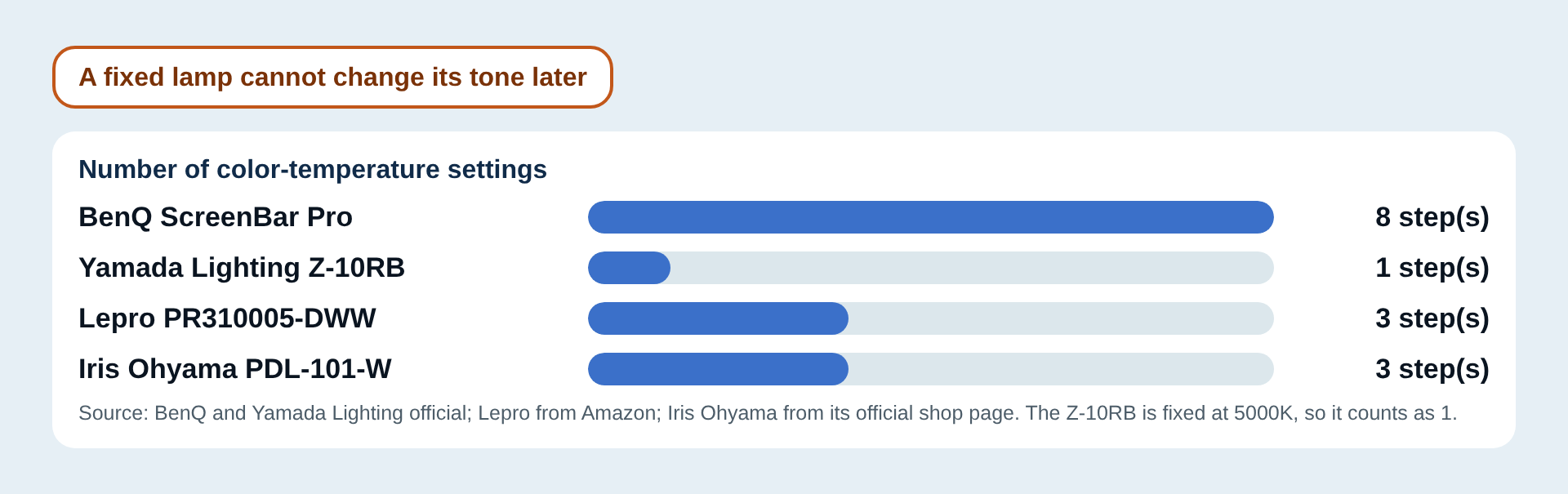
- Color temperature2700 to 6500K (8 steps)
- Brightness control16 levels
Monitor-mounted, so it uses no desk space, with 8 color-temperature steps (2700 to 6500K) and 16 brightness levels. Supports auto-dimming and auto on/off. Also #1 on the Spec Score.

Yamada Lighting Z-10RB
- Color temperature / rendering5000K, Ra94
- Clamp thicknessUp to 45 mm
- Cord length1.5 m
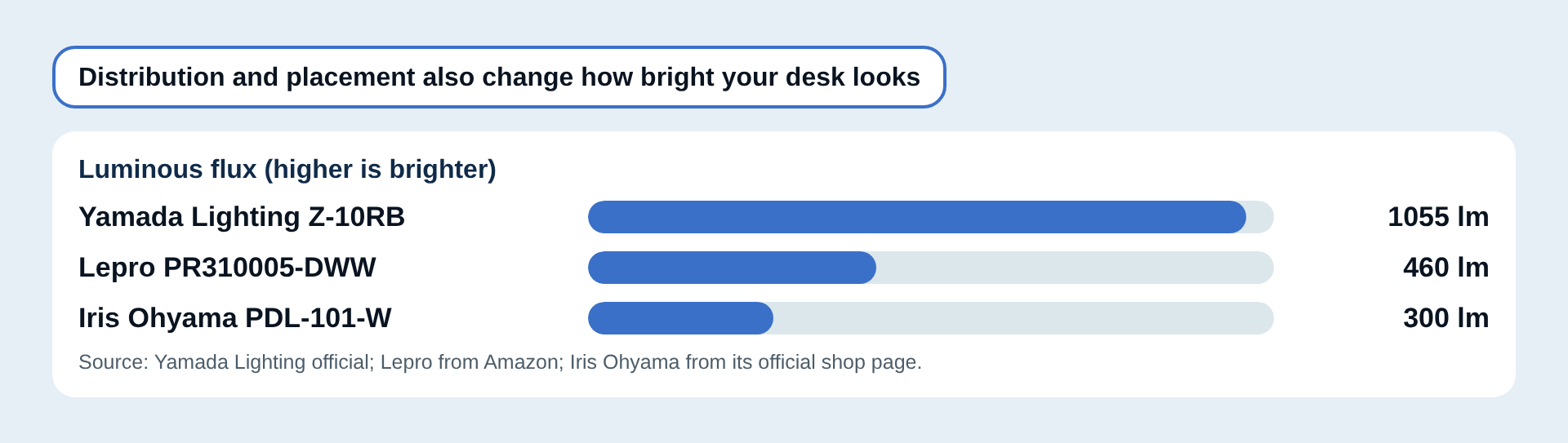
1055 lm, Ra94, fixed 5000K. Stepless dimming and an adapter included. Power draw is on the high side at 11.9 W.

Lepro PR310005-DWW
- BrightnessUp to 460 lumens
- Color renderingRa80 or higher
- Power consumption5 W
The lowest price of the four at the listed date (2026-09-02). Up to 460 lm at 5 W, with 3 color temperatures and 10 brightness levels. A power adapter must be bought separately.

Iris Ohyama PDL-101-W
- Luminous flux300 lm
- MountingStand (free-standing)
- Color temperature3 settings
A free-standing lamp with no clamp, at 6 W with the AC adapter included. Luminous flux is 300 lm.
Pros and Cons of Desk Lamps
Here's a summary of what tends to satisfy people after buying, and what's worth checking before you do.
Pros
- Fine-grained brightness and color-temperature control lets you match the light to the task at hand
- A monitor-mount style can be installed without taking up any desk space
- You can choose a mounting style — clamp or stand — that suits your desk setup
Cons
- Depending on your monitor's bezel thickness or curve, the clamp may not fit and the lamp can't be attached
- If your room lighting is already fine, there's not much need to add one
- High color-rendering, feature-rich models tend to cost more
How to Choose a Desk Lamp: 6 Points
Here are 6 points to check before you buy. The figures in the diagrams come from the official and retail-page specs of the products in this article.
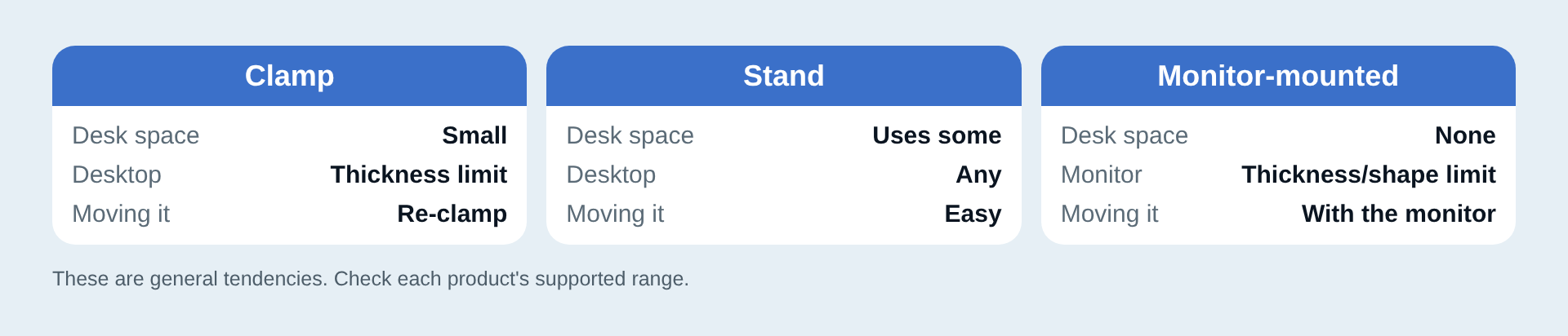
Decide the Mounting Style: Clamp, Stand or Monitor-Mounted
Your desk size, desktop thickness and monitor shape decide which style works. Start from whether you want to keep the desk surface clear or move the lamp around.
Check the Brightness (Luminous Flux)
Brightness is compared in luminous flux (lm); a bigger number means a brighter light source. The BenQ official page states brightness as a center illuminance over 1000 lux, not in lm, so it is left out of this chart (lux and lm are different units and cannot be compared directly).
Related pickYamada Lighting Z-10RB(Brightness 5/5)
See How Far the Color Temperature Can Change
Lower color temperatures look warmer, higher ones look whiter and bluer. If you want to change it by task or time of day, pick one with more settings.
Related pickBenQ ScreenBar Pro(Color temperature range 5/5)
How to Read Color Rendering
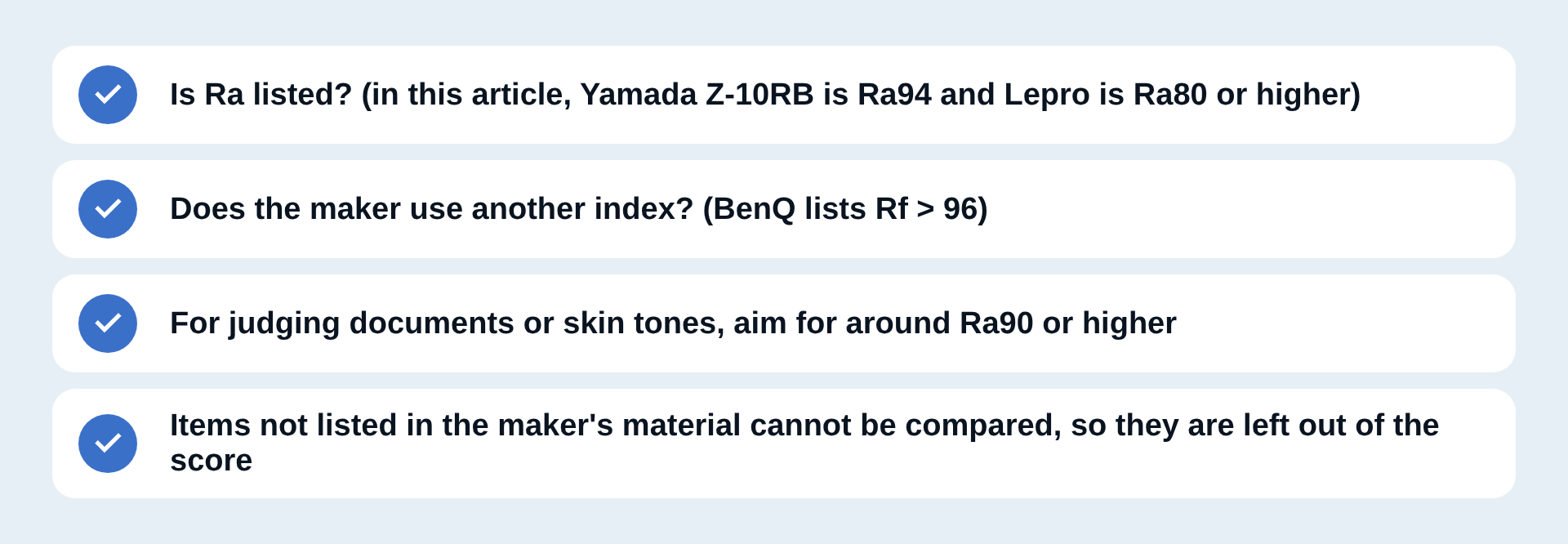
Color rendering shows how natural colors look under the light. Compare the same index (Ra) with Ra; when a maker uses another index (BenQ lists Rf), the numbers cannot be lined up directly.
Power and Power Consumption
Check whether a power adapter is included and whether the cord or cable is long enough. Lower power consumption means lower running costs (the BenQ figure is the power input maximum).
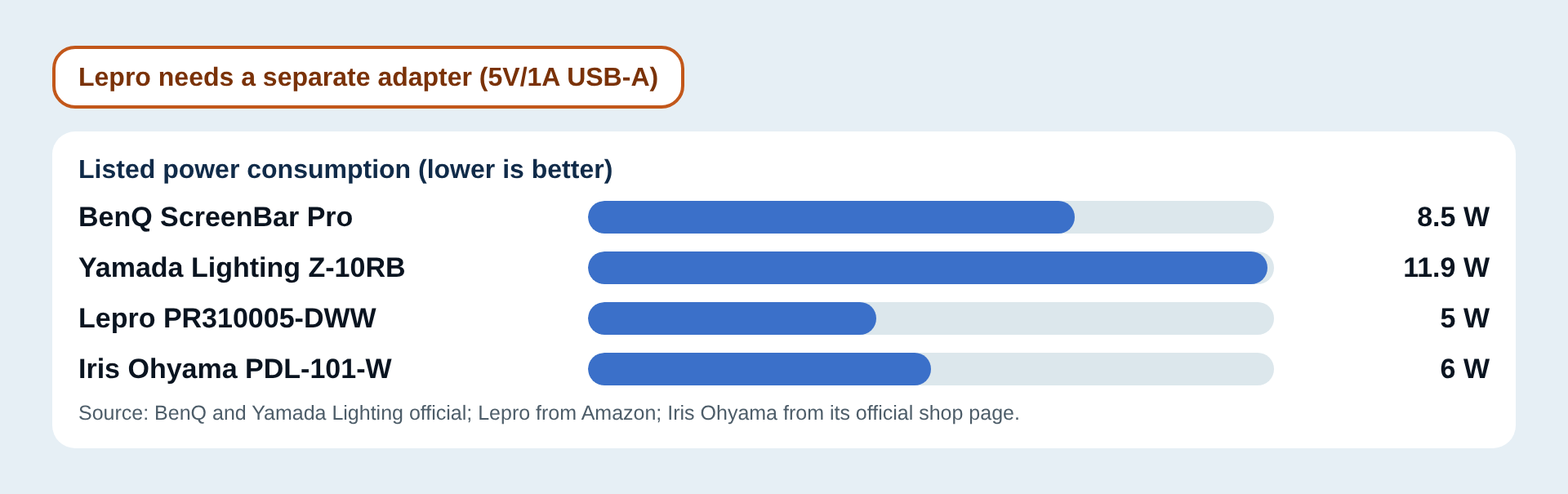
Related pickLepro PR310005-DWW(Energy use 5/5)
Extra Features
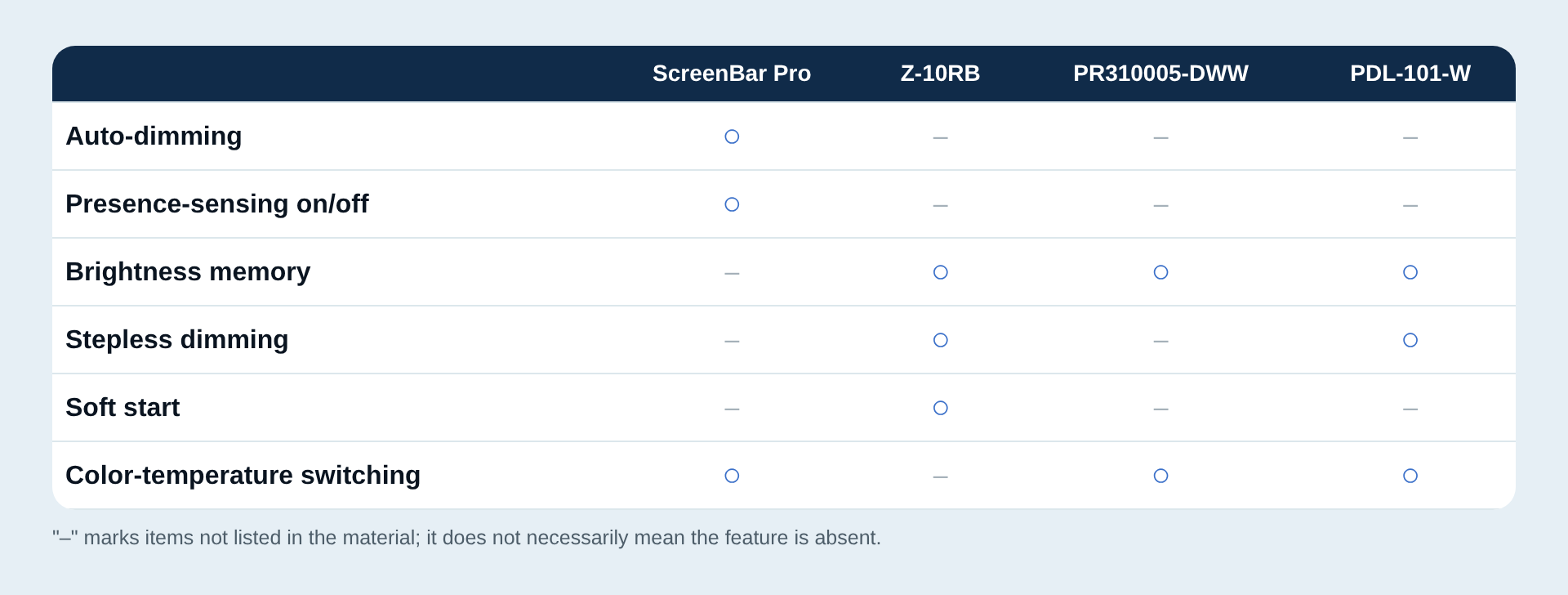
Auto-dimming, brightness memory and other handy extras, in one table.
Related pickYamada Lighting Z-10RB(Extra features 4/5)
Spec Score Ranking
→ Swipe sideways to see the full table. Use the buttons to re-sort. Click a product name for details. You can also sort by clicking a column heading.
| Rank | Product | Buy (prices as of date shown) | ||||||
|---|---|---|---|---|---|---|---|---|
| 1 | BenQScreenBar ProMonitor-mounted | 3.80 | – | 5 | 3 | 4 | 3 | See on Amazon¥23,400See on Rakuten¥23,400Price as of 2026-09-02 · affiliate link · Opens the shop's site |
| 2 | Yamada LightingZ-10RBClamp-mounted | 3.15 | 5 | 1 | 2 | 3 | 4 | See on Amazon¥13,980See on Rakuten¥14,524Price as of 2026-09-02 · affiliate link · Opens the shop's site |
| 3 | Iris OhyamaPDL-101-WStand | 3.10 | 2 | 3 | 4 | 4 | 3 | See on Amazon¥2,700See on Rakuten¥2,880Price as of 2026-09-02 · affiliate link · Opens the shop's site |
| 4 | LeproPR310005-DWWClamp-mounted (USB-powered) | 2.90 | 3 | 3 | 5 | 2 | 2 | See on Amazon¥2,039See on Rakuten¥2,399Price as of 2026-09-02 · affiliate link · Opens the shop's site |
Prices are as of 2026-09-02. They change with sales and stock, so please check the current price on the linked page.
A "–" in the table means the manufacturer and retail pages do not list that item (it is not counted in the score).
What each criterion means, and its weight
Each criterion is scored 1 to 5 and the overall score is the weighted average. The exact thresholds are in How the Spec Score Is Calculated.
- Brightnessweight 25%
- Luminous flux (lm)
- Color temperature rangeweight 20%
- Number of color-temperature settings
- Energy useweight 15%
- Power consumption (as listed; may be the power input maximum)
- Setup and powerweight 20%
- Setup and power (starts at 1 point, +1 for each that applies)
- Extra featuresweight 20%
- Extra features (starts at 1 point, +1 per listed feature, max 5)
- Overall Spec Score
- Shown only when at least 4 of the 5 criteria have a score; the weighted average is taken over the criteria that do.
Compare 2 to 3 products side by side
Tick "Add to compare" in the table above and the products appear here (up to 3).
Product Notes
BenQ・Monitor-mounted
BenQ ScreenBar Pro
- Color temperature range5/5
- Energy use3/5
- Setup and power4/5
- Extra features3/5
Good forBest if you want to keep your desk surface clear
Good points
- Hangs on the monitor, so it uses no desk space
- 8 color-temperature steps (2700 to 6500K) and 16 brightness levels
- Auto-dimming, and auto on/off by sensing whether you are there
Things to note
- At the listed date (2026-09-02) the price is 23,400 yen, the highest of the four
- Check your monitor thickness (the maker lists 0.43 to 6.5 cm)
Yamada Lighting・Clamp-mounted
Yamada Lighting Z-10RB
- Brightness5/5
- Color temperature range1/5
- Energy use2/5
- Setup and power3/5
- Extra features4/5
Good forBest for work where how colors look matters
Good points
- Bright: 1055 lm and over 2000 lx directly below
- Color rendering of Ra94 (as listed by the maker)
- Continuous dimming, and it remembers the last brightness
Things to note
- Color temperature is a single 5000K and cannot be changed
- At 11.9 W it draws the most of the four products
Iris Ohyama・Stand
Iris Ohyama PDL-101-W
- Brightness2/5
- Color temperature range3/5
- Energy use4/5
- Setup and power4/5
- Extra features3/5
Good forBest if you want a free-standing lamp you just set down
Good points
- No clamp needed; just place it on the desk
- 6 W power draw, with the AC adapter included
- Stepless dimming that remembers the brightness
Things to note
- At 300 lm it is the lowest of the three products with an lm figure
- Color temperature has 3 settings, which is few if you want fine control
Lepro・Clamp-mounted (USB-powered)
Lepro PR310005-DWW
- Brightness3/5
- Color temperature range3/5
- Energy use5/5
- Setup and power2/5
- Extra features2/5
Good forBest if you want to try one cheaply first
Good points
- Low power draw of 5 W
- Up to 460 lm, 3 color temperatures and 10 brightness levels
- Light, at about 0.4 kg
Things to note
- No power adapter included (you need a separate 5V/1A USB-A adapter)
- Only 3 color temperatures (warm, white, daylight)
Who Desk Lamps Are a Good Fit For — and Who Should Consider Other Options
As a category, desk lamps tend to work well for the following people.
Good fit if you...
- Want fine control over brightness and color temperature to suit the task
- Want to pick a mounting style — clamp, stand or monitor-mounted — to suit your desk
- Find the room light alone leaves the desk too dark
Consider other options if you...
- Are happy with the room lighting and do not need another light
- Have a monitor with a thick or curved bezel that a monitor-mounted lamp cannot clamp to
- Are put off by the price of high-CRI, feature-rich models (worth starting with a cheaper one)
Still Deciding? Check These in Order
If you are considering a monitor-mounted light, a bezel that is too thick or curved may not take the clamp — check the supported range before buying.
For work where you need to judge document or skin tones accurately, a high-CRI model around Ra90 is the one to pick. For everyday reading and writing, prioritise the brightness and color temperature range instead.
A clamp will not grip a desk top that is too thick or too thin, so measuring beforehand avoids a wasted purchase.
Common pitfalls to check before buying
With monitor-mount lamps like the BenQ ScreenBar Pro, if your monitor's bezel thickness or curvature falls outside the clamp's supported range, you won't be able to attach it — checking your monitor's bezel thickness before buying helps you avoid that. For products like the Lepro where the power adapter is sold separately, it's a good idea to have a compatible 5V/1A USB power source ready in advance, so you don't run into a lamp you can't power once it arrives. And for clamp-mount lamps in general, if your desktop is thicker than the clamp's supported range, it won't attach, so it's worth measuring your desk beforehand.
Best Pick by Situation
If you want to keep your desk surface clear, BenQ ScreenBar Pro is the pick. For work where color accuracy matters, go with Yamada Lighting Z-10RB. If you want to keep costs down while you try one out, Lepro is the candidate. And if you want a free-standing lamp you just set down, Iris Ohyama PDL-101-W is the candidate.
First Steps After You Buy
After setting it up, adjust the color temperature and brightness to match what you'll be doing (computer work, writing, reading, and so on), then use it for a few days before locking in your final settings — it makes the lamp easier to live with. For clamp-mount models, check right after unboxing that it's securely fastened to your desktop, and re-tighten it if you notice any wobble.
How the Spec Score Is Calculated
Each criterion is scored from 1 to 5, and the overall score is the weighted average. We use the manufacturer's official figures; where the official site could not be read, we fill in from Amazon, Rakuten Ichiba, Kakaku.com and similar retail or comparison pages (only pages that match the exact model number). A criterion with no published figure is left out and the average is taken over the rest (for care and features, only items that are actually listed earn points).
| Brightness (25% weight) | Luminous flux (lm) 1000 lm or more = 5 / 700+ = 4 / 450+ = 3 / 300+ = 2 / below = 1 |
|---|---|
| Color temperature range (20% weight) | Number of color-temperature settings 8 or more = 5 / 5+ = 4 / 3+ = 3 / 2+ = 2 / fixed (1) = 1 |
| Energy use (15% weight) | Power consumption (as listed; may be the power input maximum) 5 W or less = 5 / 6 W = 4 / 9 W = 3 / 12 W = 2 / above = 1 |
| Setup and power (20% weight) | Setup and power (starts at 1 point, +1 for each that applies) (1) power adapter included (2) cord or cable of 1.8 m or more (3) uses no desk space (monitor-mounted) (4) arm lets you change angle and position |
| Extra features (20% weight) | Extra features (starts at 1 point, +1 per listed feature, max 5) Auto-dimming / presence-sensing auto on-off / brightness memory / stepless dimming / soft start |
Summary
This comparison uses published specs, not hands-on impressions. Decide whether you want to keep the desk clear, put color rendering first, or just try one cheaply, then choose.
Related Articles
Update history
Show update history (2)
- Rewritten on the new template (Spec Score, product detail pages).
- Display improvements (summary at the top, ranking cards, sortable comparison table with side-by-side compare, in-page navigation). Scores, prices and links are unchanged.